$5.00
$13.00
50% OFF! Hot items selling fast—Grab them before they're gone!
 Unconditional Satisfaction GuaranteeNo Shipping Fees Above 302 Months to Decide. Returns Simplified.
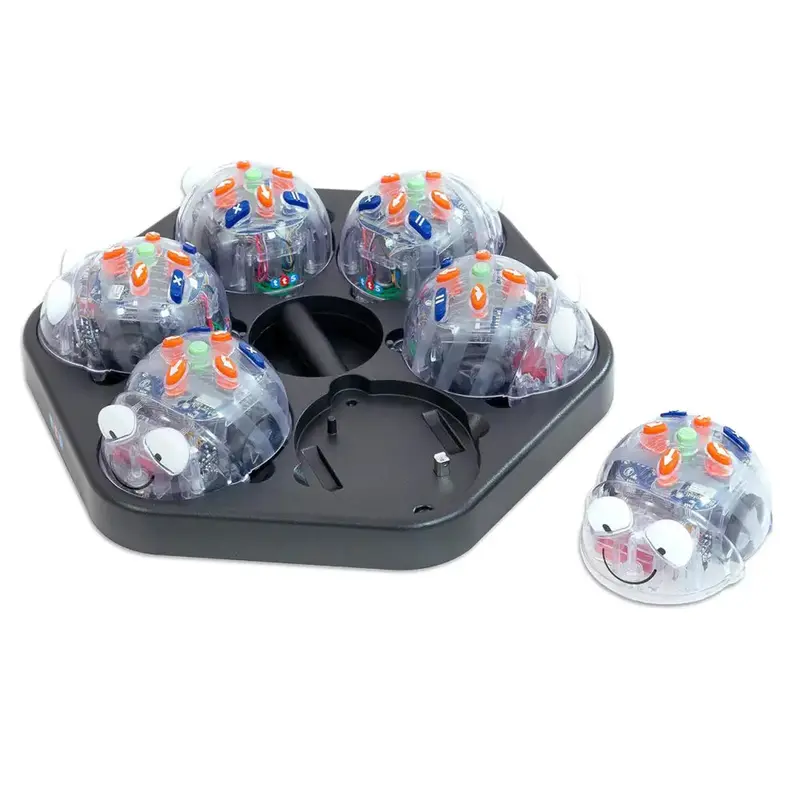
See and Say Blue-Bot Bluetooth Enabled Programmable Floor Robot Class Pack – 6pcs Blue-Bots with FREE Docking Station with USB Cable
A programmable floor robot designed to introduce control and programming in an engaging way.
With Bluetooth-enabled functionality, this robot offers control via tablets or PCs, enhancing interactive learning.
This programmable floor robot introduces students to the world of coding and robotics in an interactive and engaging manner. With the capability to communicate with other Blue-Bots and Bee-Bots, it fosters teamwork and develops communication skills. Its transparent design allows learners to peek inside, sparking curiosity about how technology works.
The robot’s Bluetooth-enabled connectivity enables seamless interaction with tablets, enriching the programming experience without compromising security, as the companion app does not collect personal data. Its rechargeable feature highlights an eco-friendly approach, reducing the reliance on disposable batteries.
Aligned with the Computing curriculum at Key Stages 1 and 2, the robot serves as a practical tool for teaching programming, debugging, and algorithm understanding and has a memory of up to 200 steps. It encourages the development of critical computational thinking and problem-solving abilities, equipping learners for the digital age.
Supports the National Curriculum:
– Computing, Key Stage 1; Create and debug simple programs.
– Computing, Key Stage 1: Understand what algorithms are, how they are implemented as programs on digital devices, and that programs execute by following precise and unambiguous instructions.
– Computing, Key Stage 2: Design, write and debug programs that accomplish specific goals, including controlling or simulating physical systems and solve problems by decomposing them into smaller parts.
Take Blue-Bot to the next level by using the Blue-Bot app to create a program on screen and send it to Blue-Bot via the Bluetooth connection. Then watch as the actual Blue-Bot along with the one on the screen follows the program. If your code didn’t do what you wanted, simply change the commands on screen and send the program again. Creating a program on-screen, sending it to Blue-Bot, and revising as desired provides an additional conceptual level of understanding that further develops algorithmic thinking skills.
The Blue-Bot app adds additional capabilities not available on Blue-Bot itself. These include 45 turns and repeating command sequences expanding learning opportunities provided by Blue-Bot. There is no charge for the Blue-Bot app which is available for iPads from the Apple Store and Android tablets from the Google Store (search for Blue-Bot) and for Windows and Mac software in the Terrapin Downloads section.
Take advantage of the hidden Blue-Bot capability to turn 45 left or right with the TacTile Code Reader and a set of Extension Tiles. Additionally, you can have Blue-Bot come off the bench and run it around the bases of the Baseball Mat, made specifically to challenge young coders!
View moreWhat’s Included
6x Blue-Bots STEM Coding Toy Robot – See & Say Version
1x FREE Docking Station with USB Cable
Dimensions(L x H x W): 6 x 4 x 6 inchesMultimedia
docReady(function() {$(‘button[aria-controls=unique-tab-5]’).one(‘click’,function() {$(“#iframe-video-1”).html(‘‘);})});Specifications
Blue-Bot and Blue-Bot with See & Say feature eye light indicators:
Solid Blue connected via Bluetooth
Flashing Red Low battery: needs charging
Solid Red Charging
Solid Green Fully charged
Rechargeable battery via USB
# of switches on the bottom: 3
# of commands that can be stored: 200
Has low power “Sleep Mode”: YES
Plays sounds: YES
Can customize button sounds: YES
Has sensors to detect other ‘bots: YES
Be controlled remotely: YES
Access 45-degree turn capability: YES
Repeat a set of instructions: YES
Connect to TacTile Code Reader: YES
Connect to the Blue-Bot Online Emulator: YES